As development teams adopt AI-generated code and manage security across more repositories and workflows, keeping everything connected can become increasingly challenging.
Scan configurations can drift over time, dependency risk can change between scans, and security activities often span multiple tools and environments. The latest Black Duck Polaris™ Platform release helps bring AI-powered analysis, scan governance, and remediation workflows together through expanded AI capabilities, consistent scan policies, and support for self-hosted development environments. Combined with enhanced risk visibility, testing coverage insights, and operational transparency, these enhancements help security teams move from detection to action with greater confidence.
AI-driven security and automation: Bring AI analysis into governed security workflows
Bring your own LLM to Signal AI code analysis: Run agentic AI analysis on infrastructure you control
Organizations are increasingly recognizing that effective application security requires a hybrid analysis strategy. Deterministic scanning provides comprehensive, reproducible coverage, and LLM-based analysis helps identify classes of vulnerabilities that traditional approaches struggle to detect, including complex behavioral and business logic issues. Together, these approaches provide broader application security coverage across the software development life cycle. Black Duck brings these approaches together through flexible AI deployment options and unified management of results in Polaris.
With Signal code analysis and bring your own LLM (BYO LMM), organizations can run Signal AI code analysis using their own LLM infrastructure or Black Duck-managed endpoints. Each of its six agents can use a different provider, model, and endpoint, giving teams greater control over how AI analysis operates within their environment. Signal AI code analysis results can then be uploaded to Polaris in SARIF format, where they are properly classified under the new AI tool type and managed alongside deterministic scanning results through unified policies, prioritization, triage, audit trails, and governance workflows. BYO LLM provides flexibility over the analysis infrastructure and models, and Polaris provides a consistent foundation for managing the results.
Key capabilities
- Flexible LLM infrastructure: Run Signal AI code analysis using your own LLM infrastructure or Black Duck-managed endpoints.
- Per-agent LLM configuration: Configure each of the six agents with the provider, model, and endpoint best suited to its analysis task.
- Compliance and data residency: Keep source code and analysis prompts within your cloud tenancy or on-premises environment.
- Unified management in Polaris: Polaris automatically classifies uploaded Signal AI code analysis results under the new AI tool type, making them easier to distinguish and manage alongside deterministic findings through consistent workflows and governance controls.
- Broad provider support: Use OpenAI, Azure OpenAI, AWS Bedrock, GCP Vertex AI, or an OpenAI-compatible proxy with automatic provider detection.
Policy, governance, and compliance: Apply consistent controls and current standards
Central rule configuration in Polaris: Define scan rules once, enforce them everywhere
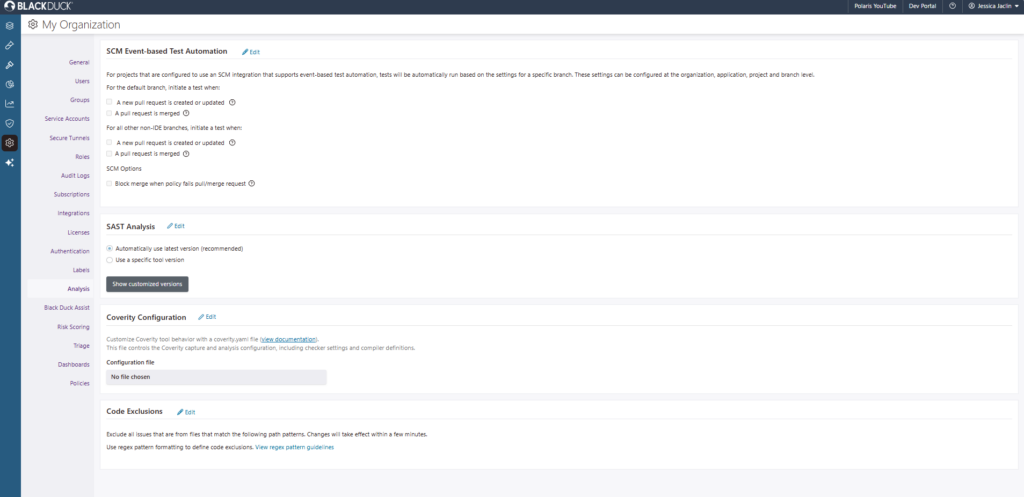
Every repository has its own scan configuration, and managing those configurations across hundreds or thousands of projects can quickly become difficult. Central rule configuration helps security teams define rule profiles once in Polaris and apply them consistently at the organization, application, or project level through hierarchical inheritance. Whether scans run through CI pipelines, CLI scans, or integrations, Polaris automatically enforces the effective rule profile, reducing manual effort while helping ensure consistent scanning across environments.
Key capabilities
- Hierarchical inheritance with guardrails: Apply mandatory rule profiles at the organization, application, or project level with inherited policies that provide centralized control while supporting local flexibility.
- Automatic enforcement across environments: Apply rule configurations consistently across CI pipelines, CLI scans, and integrations without per-pipeline setup or manual intervention.
- Built-in governance and visibility: Use rule-based access control, audit trails, version awareness, and scan-level profile visibility to demonstrate what ran, where, and under whose authority.
CWE Top 25 support: Assess findings against the latest industry-recognized standard
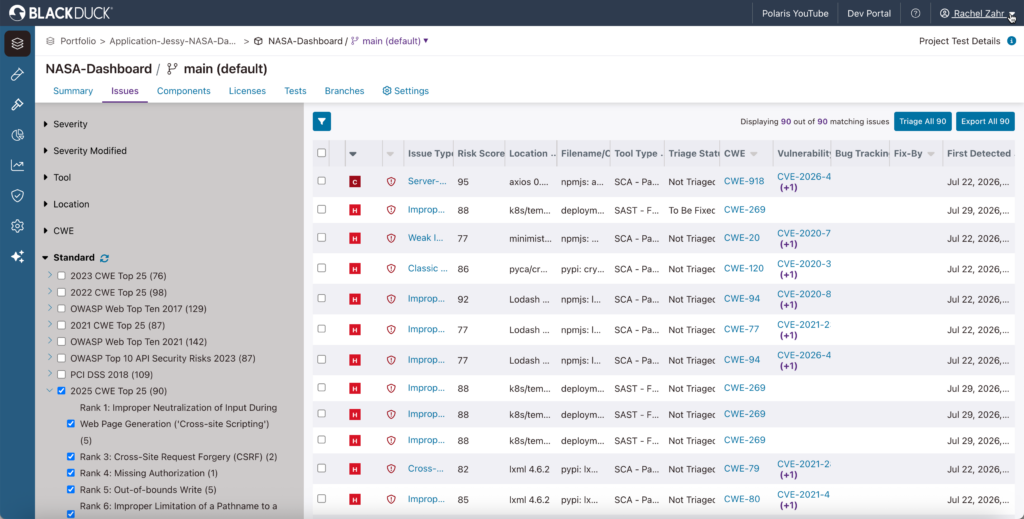
Whether you’re preparing for an audit, supporting compliance initiatives, or reporting on application security risk, alignment with current industry standards matters. Polaris supports both the 2024 and 2025 CWE Top 25, helping teams evaluate findings using recognized security benchmarks across policy management, dashboards, reporting, and issue analysis. Existing functionality remains intact, making it easy to adopt the latest standard while maintaining continuity with existing workflows.
Key capabilities
- Evaluation against the latest 2025 CWE Top 25 list: Assess applications against the most current industry-recognized list of the most dangerous software weaknesses.
- Updated standards across Polaris workflows: Use the 2024 or 2025 CWE Top 25 across policy filters and violation criteria, reporting and dashboards, and issue management.
Developer workflows and integrations: Connect repositories, findings, and remediation
SCM on-prem support: Extend application security to self-hosted source code repositories
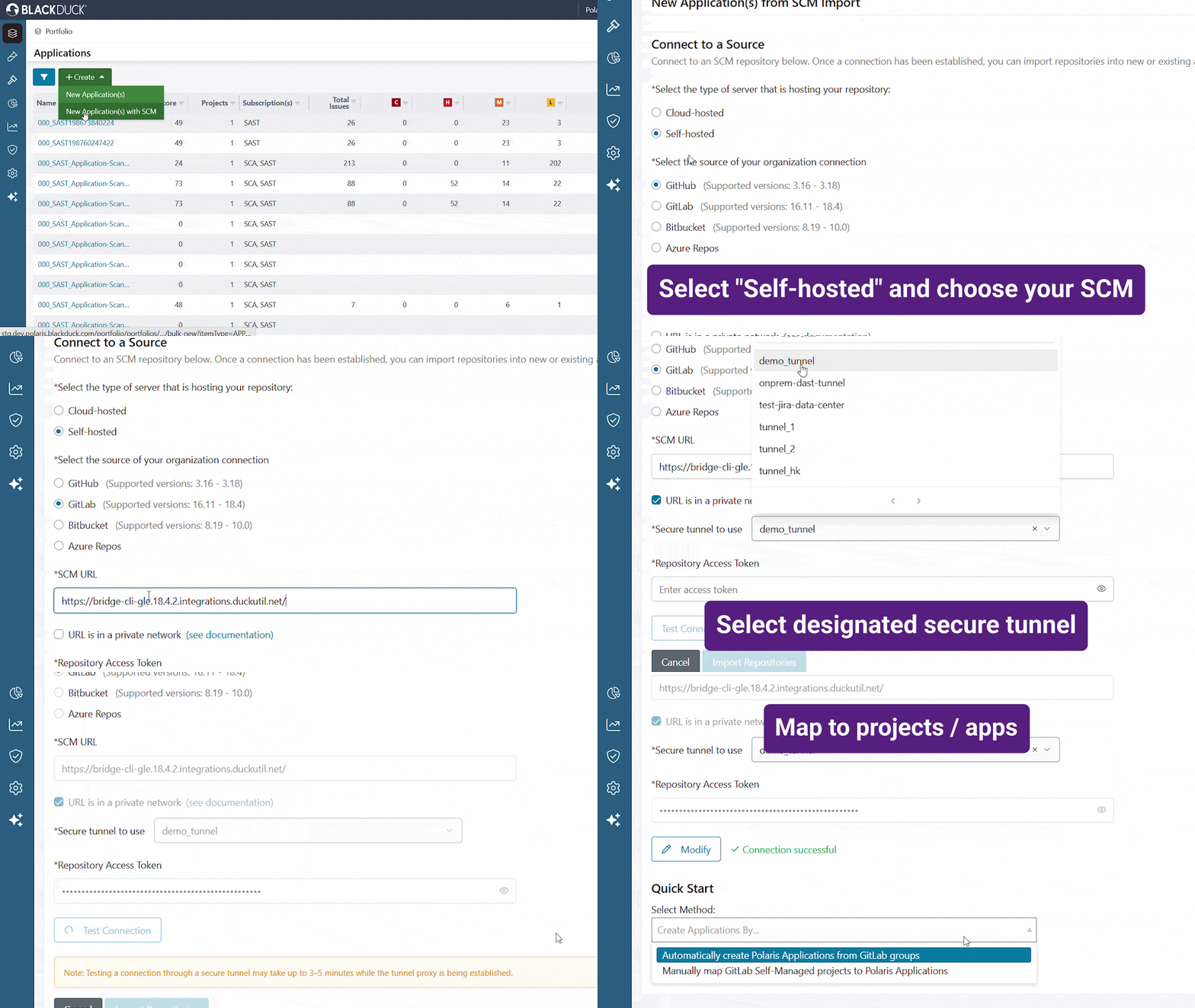
Many organizations maintain source code in self-hosted SCM platforms to meet regulatory, security, or operational requirements. Connecting cloud-based security testing workflows to these repositories has traditionally required complex network configurations, manual onboarding, or exceptions to existing security controls. Polaris now extends support for on-premises SCM environments, enabling organizations to connect and onboard repositories from supported self-hosted source control platforms while maintaining existing network boundaries and security requirements. Teams can apply consistent application security practices, policies, and visibility across both cloud-hosted and self-managed development environments.
Key capabilities
- Support for self-hosted SCM platforms: Connect Polaris to supported on-premises source control platforms, including self-managed GitHub (previously released), GitLab, Azure DevOps Server, and Bitbucket Server/Data Center.
- Repository discovery and onboarding: Discover repositories and onboard projects individually or in bulk to speed up application coverage. Trigger SAST and SCA scans from these repository events and development workflows to integrate security testing into existing processes.
- Developer remediation workflows: Enable remediation activities, including pull request–driven workflows, directly within supported self-hosted SCM environments.
- Consistent governance across environments: Apply the same Polaris policies, reporting, visibility, and application security workflows across cloud-hosted and on-premises repositories.
Risk prioritization and noise reduction: Focus on the dependency changes that actually matter
Async SCA notifications: Stay ahead of critical open source dependency risk
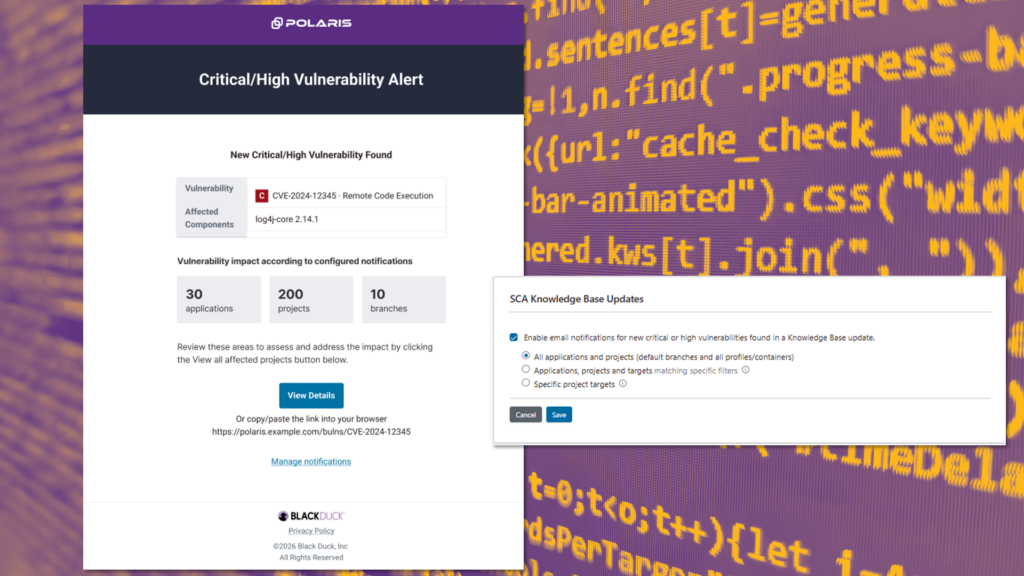
Critical dependency risk doesn’t always align with your scanning schedule. Open source dependency risk can change between scans as new vulnerabilities are disclosed and existing advisories are updated. By subscribing to notifications for selected applications, projects, or branches, teams can stay informed when new critical- or high-severity vulnerabilities are discovered or when existing vulnerabilities increase in severity.
Key capabilities
- Email alerts for critical open source dependency changes: Receive notifications when Polaris identifies new critical- or high-severity vulnerabilities or reclassifies existing vulnerabilities as critical or high severity.
- Project- and branch-level subscription controls: Monitor the applications, projects, and branches that matter most to your team.
- Direct access to affected components: Open component search directly from notification emails to investigate exposure and determine next steps.
Comprehensive scanning with depth and accuracy: See what your scanner saw, not just what it found
Dynamic sitemap view: Visualize your testing coverage and verify it’s complete
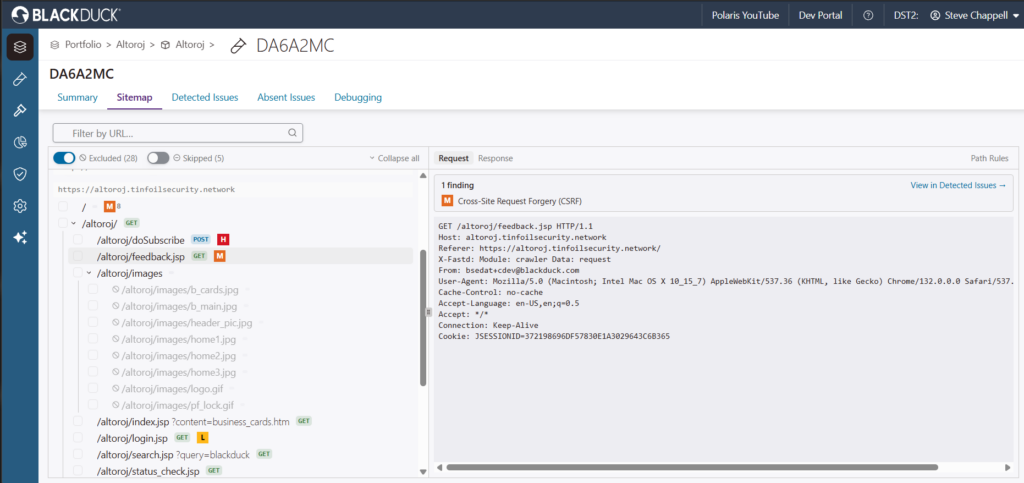
The fAST Dynamic sitemap view provides a visual representation of the URLs, endpoints, and resources discovered during dynamic testing. By seeing exactly what the scanner explored, teams can validate testing coverage, identify gaps or misconfigurations, and confirm that scans reached the areas of the application they expected to test. The hierarchical sitemap makes it easier to understand application structure and verify scan scope beyond the findings themselves.
Key capabilities
- Displays of discovered application structure: View URLs, endpoints, and resources in a hierarchical sitemap that reflects what the scanner explored.
- Validation of testing coverage: Identify potential gaps, misconfigurations, or unexpected endpoints to confirm scans covered the intended application scope.
Enterprise scale and reliability: A platform you can build your security program on
Platform reliability and performance: Our commitment to the uptime your security program depends on
When your entire AppSec program runs through one platform, that platform’s reliability isn’t a nice-to-have—it’s the foundation everything else stands on. Scans need to run on schedule, policies need to be enforced without interruption, and CI/CD pipelines can’t wait on a service that isn’t there. As Polaris adoption grows across enterprise environments, we’re investing in the performance, reliability, and uptime that scale demands.
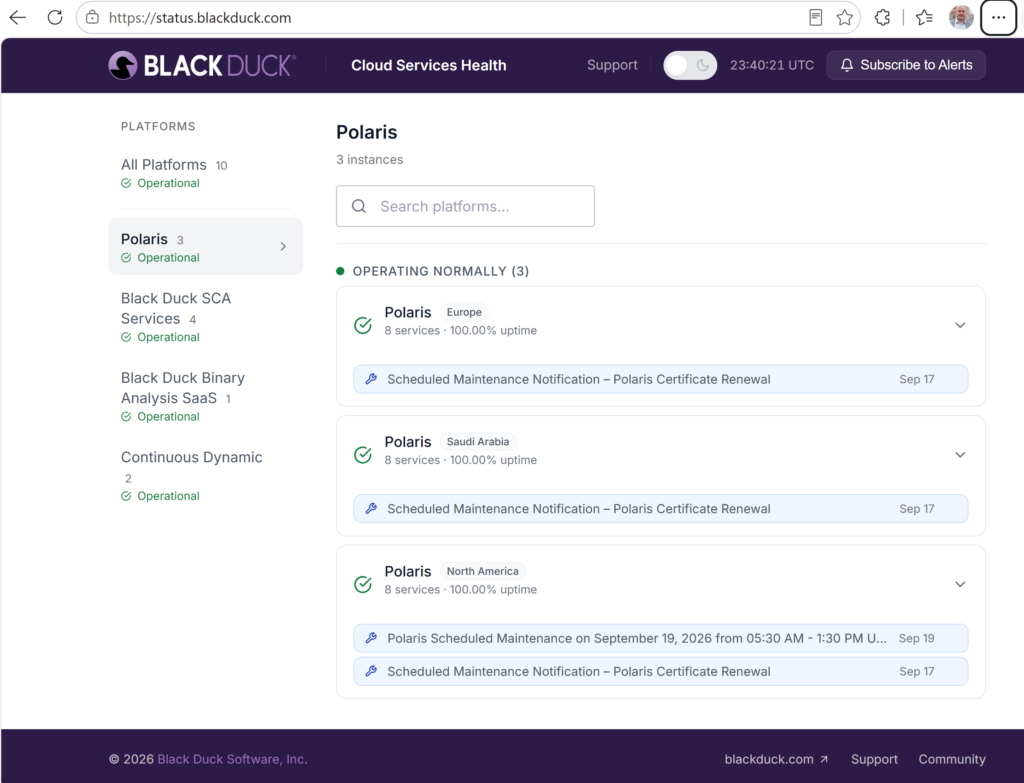
And we’re not asking you to take that on faith. The Polaris status page is where you can hold us to it: You get real-time visibility into service health, platform availability, and scheduled maintenance across Polaris environments. As our reliability investments land, the results show up there—for everyone to see. Monitor status, review upcoming maintenance events, and subscribe to alerts, so operational changes never catch your workflows by surprise.
Key capabilities
- Real-time service status: Review upcoming maintenance and service events in advance, so teams can plan around scheduled windows instead of discovering them mid-scan.
- Alerts for status changes: Subscribe to notifications for status changes and planned maintenance, so you can have proactive awareness without manually checking the page.
- Centralized visibility: Access platform health information in a single location—one authoritative source for operational status across your organization.
AI findings that are governed, not orphaned
Bringing more security activities into one platform is most valuable when teams can manage them consistently and act on the results. This release expands the controls of AI-powered analysis, centralizes control over scan rules, and extends security workflows to self-hosted repositories. Updated CWE Top 25 support, critical SCA risk notifications, enhanced visibility into dynamic testing coverage, and greater transparency into platform health help teams better understand where attention is needed and respond with confidence. Together, these enhancements help security teams reduce fragmentation across tools and environments, apply more consistent governance, and move from finding risk to taking action with less friction.
Ready to explore what’s new? Log in to Polaris to configure a central rule profile, connect self-hosted repositories, subscribe to SCA risk notifications, or explore the workflows most relevant to your team. For more details, check out our full release documentation or visit our Polaris YouTube channel.